
Общая информация
В Облачном проекте есть свой каталог игр.
Игры, оформленные в формате карточек - официально поддерживаются сервисом.
Однако, для свободы наших игроков в Облачном пространстве, мы внедрили несколько карточек общего доступа.
В них вы можете как поиграть в игры, которые уже предустановлены на сервисе - загрузка этих игр будет мгновенной.
Так же, вы можете запускать и игры из личной библиотеки Steam, EGS и иных лаунчеров, — их нужно лишь скачать в рамках сессии
Какие лаунчеры установлены в карточке?
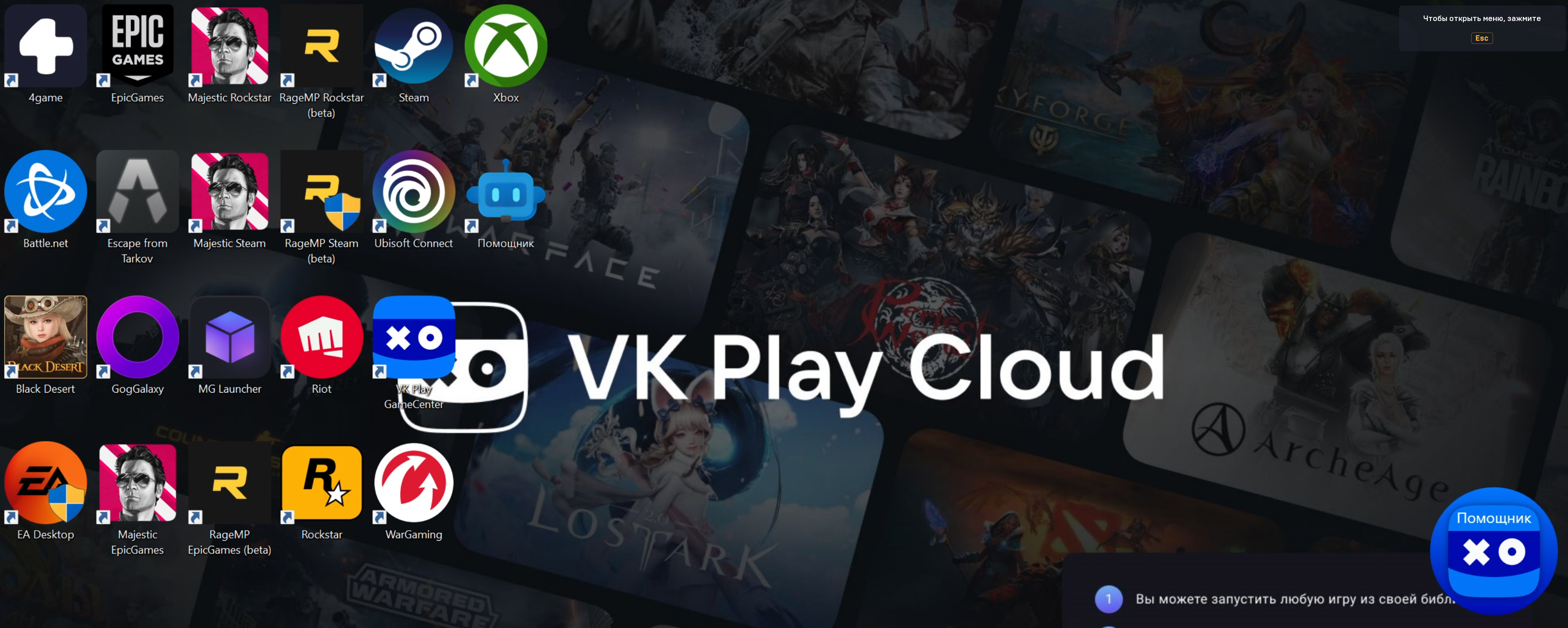
В карточке "Все лаунчеры" доступны:
- 4game
- Battle.net;
- Peral Abyss (лаунчер Black Desert);
- EA Desktop;
- Epic Games Store;
- BSG (лаунчер Escape From Tarkov);
- GOG Galaxy;
- Majestic RP (лаунчер для версий GTA V для Rockstar, Steam и EGS);
- MyGames Launcher
- Rage MP (лаунчер для версий GTA V для Rockstar, Steam и EGS);
- Steam;
- Ubisoft Connect;
- Riot;
- VK Play;
- WarGaming;
- Xbox App;
Часто возникающие вопросы и нюансы
Главный нюанс карточки - в удобстве смены лаунчеров в рамках сессии.
Однако, это не дает игроку доступ к дополнительным параметрам папок и файлов игры, данный тип доступа есть только в карточке Виртуального ПК.
Часто данную карточку запускают так же по причине того, что в ней повышена конфигурация стрима - до 120 FPS.
Важно отметить, что игры проходят процедуру оптимизации исключительно в своих карточках (пример, Dota 2).
Поэтому, если в карточке Все лаунчеры есть заминка с производительностью игры - запускайте её из карточки.
Так же, игра Escape From Tarkov, в силу ограничений, работает только в карточке Все лаунчеры.
Q: Как запускать игры?
A: Для запуска вашей игры, выберите лаунчер, в котором приобретена игра и запустите его.
Q: После запуска лаунчера вам необходимо авторизоваться в своей игровой учетной записи.
A: Пройдя успешно авторизацию, найдите свою игру в библиотеке и установите её.
Игры из нашего каталога уже предустановлены на наших серверах, поэтому их установка пройдет почти моментально.
Q: Будут ли работать мои сохранения?
A: Если у игры есть облачные сохранения, то все сейвы будут выгружаться. Если такой функции нет, то мы попробуем сами сохранить ваш игровой прогресс.
Обязательно проверьте, что у вас включена синхронизация с облачным сервисом лаунчера. Подробнее о системе сохранений в статье Как работают сохранения на сервисе.
Q: Я хочу поиграть в игру, которая у вас уже есть (Elden Ring, Genshin Impact, Warface, Fortnite и тп.)
A: Рекомендуем использовать обычные карточки игр или общие карточки лаунчеров - так игру не нужно будет устанавливать при каждом запуске. Ознакомиться с каталогом игр на нашем сервисе можно тут.
Q: Как играть в игры из лаунчера Xbox?
A: Вам надо будет авторизоваться под вашей учетной записью Microsoft, выбрать нужную игру и скачать её на диск "D".
Q: Какие моды можно устанавливать для игр?
A: В карточке "Все лаунчеры" можно установить только официальные моды и аддоны для игр, которые разрешены разработчиками игр (например, моды из Steam Workshop).
Для скачивания и установки другие модов и пользовательских дополнений вы можете воспользоваться карточкой Виртуального ПК.
Q: Почему не запускаются некоторые игры?
A: Карточка "Все лаунчеры" - хоть и является более свободной в плане действий игрока, она все еще работает по правилам Облачного запуска.
Поэтому игры, которые НЕ адаптированы под работу в Облачном сервисе, здесь так же не запустятся.
С полным списком таких игр вы можете ознакомиться по ссылке.